

A few days ago, I found out Oracle Cloud gives away an Always Free VM instance. My first thought was the obvious one — another box to deploy side projects on, run a cron job, host a small API.
The next day, I did something different, and it surprised even me: I didn't deploy a single app on it. Instead, I used that free VM to design and secure a private network layer for my own digital life — every laptop, phone, and service I own, routed through infrastructure I actually control.
What started as "let me put something useful on this VM" turned into a genuine rabbit hole through Tailscale, WireGuard, encrypted DNS, Docker networking, and the kind of architectural second-guessing that only shows up once you start asking should this even exist instead of can I build this.
This post is that journey — the decisions, the wrong turns, and the diagrams I redrew three times before they told the truth.
The real question wasn't "what can I deploy," it was "what should be exposed"
Here's the thesis, stated plainly: the hardest part of building your own infrastructure isn't adding capability — it's deciding what to remove from the public internet.
I already had devices, accounts, and services scattered everywhere. What I didn't have was one small, self-owned piece of infrastructure that sat between me and the internet — something that could filter what leaves my devices before it ever reaches the outside world. The free VM wasn't the interesting part. The interesting part was realizing that a single cheap box, positioned correctly, could quietly replace three or four things I was either paying for or not doing at all: a VPN subscription, an ad blocker, and a private admin layer for anything else I'd host later.
That reframing — from "compute I can deploy on" to "trust boundary I control" — is what shaped every decision after it.
The version I almost built (and why it was wrong)
My first mental model looked like this:
Internet
   ↓
Oracle Public IP
   ↓
Port 3000 (AdGuard) / 3001 (Uptime Kuma) / 51821 (wg-easy)
Put the VM online, open the ports for the dashboards I need, done. It's the version everyone builds first, because it's the version every tutorial shows you.
It works. It's also wrong, for a reason that took me a day to actually sit with: none of those dashboards needed to be reachable from the internet in the first place. An AdGuard admin panel and a monitoring dashboard exist to be used by me, from my devices — not to be discoverable by anyone scanning Oracle's IP ranges. Convenience had quietly talked me into a bigger attack surface than the problem required.
What I actually built — and why each layer earns its place
Once I stopped optimizing for "get it working" and started optimizing for "minimum necessary exposure," the architecture settled into three layers that each do exactly one job.
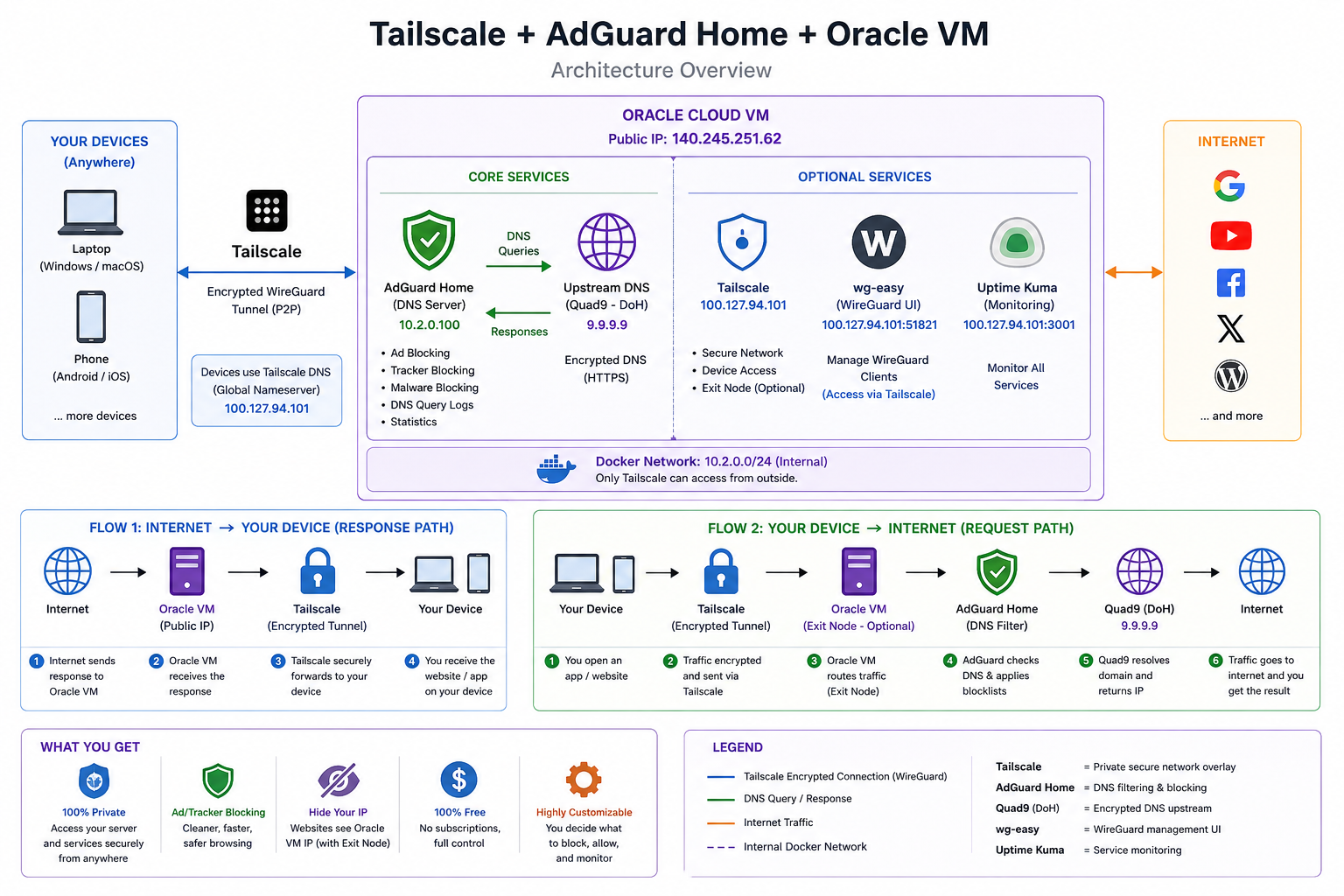
Tailscale — private connectivity. Every device I own (laptop, phone, the VM itself) joins the same Tailnet over an encrypted, peer-to-peer WireGuard tunnel. No admin panel is ever bound to the public interface — the only way in is through the Tailnet.
AdGuard Home — DNS filtering, sitting in the middle. All of my devices point their DNS at the VM's Tailscale address. Every query gets checked against blocklists before it goes anywhere.
Quad9 over HTTPS — the upstream resolver. Whatever AdGuard doesn't block gets forwarded encrypted, so even my DNS traffic to the wider internet isn't sitting in plaintext for a network operator to read.
One realization did most of the architectural work for me: Tailscale is already WireGuard under the hood. I'd been treating "Tailscale" and "WireGuard" as two separate tools to evaluate, when really the question was whether I needed a second, manually-managed WireGuard deployment on top of a tool that already gives me WireGuard's security properties with none of the key-management overhead. I didn't. So wg-easy stayed in the stack, but demoted to optional — available for the day I want a plain VPN client on a device that can't run Tailscale, never load-bearing for daily use.
Everything runs in Docker on a 10.2.0.0/24 internal bridge network, with Tailscale as the single gatekeeper deciding what's reachable from outside the box at all. The request path, end to end, looks like this:
Your device → Tailscale (encrypted tunnel) → Oracle VM
     → AdGuard Home (DNS filter) → Quad9 (DoH) → Internet
And the response path runs it back in reverse. Nothing in that chain is guessing — I confirmed it by reading AdGuard's own query log, and watching sync.duckduckgo.com sail through while improving.duckduckgo.com got blocked was the first moment the whole thing felt real instead of theoretical.
The diagram that kept me honest
Every time I thought the design was done, I redrew the "who can reach what" diagram, and it caught something I'd missed the first two times.
The version worth keeping isn't a topology diagram — it's an exposure diagram: draw one arrow for every path that reaches from the public internet into your VM, and interrogate each one. In my case, the honest final version had exactly one: Tailscale's encrypted tunnel. AdGuard, the monitoring dashboard, and the WireGuard UI all sit behind it, unreachable by anything that isn't already a trusted peer on the Tailnet. If I ever add a new service, that's the diagram I redraw first — not the feature list.
What this setup does not protect against — on purpose
It would be easy to end this post with "and now I'm completely private," and it would also be dishonest. A few things worth being upfront about:
- DNS filtering isn't traffic routing. AdGuard sees which domains I look up; it doesn't see or route my general web traffic. That only happens if I explicitly turn the VM into a Tailscale exit node — which I haven't, because it means every byte of my browsing now depends on one VM's uptime and Oracle's network, not just my DNS queries.
- A single VM is a single point of failure. If the VM goes down, my devices need a documented DNS fallback, or I've traded "ads and trackers" for "no internet at all" — which is a worse failure mode than the one I was solving.
- Fail-open vs. fail-closed is a real tradeoff, not a settled one. If AdGuard itself goes down, should DNS silently fall back to an unfiltered resolver, or fail closed and break browsing until I fix it? I chose fail-open for now, because for my threat model, an outage of privacy filtering is a smaller cost than an outage of the internet — but that's a judgment call, not a default I'd hand someone else without asking their situation first.
- I'm still trusting Tailscale's coordination servers to broker the initial handshake between my devices, even though the traffic itself is end-to-end encrypted. Anyone building this for a stricter threat model should account for that dependency explicitly. None of this is a flaw in the design — it's the actual shape of the tradeoff. Pretending otherwise is how homelab writeups end up teaching bad mental models.
The rule of thumb I took away
If a service doesn't need to be public, don't make it public — and more tools is not the same thing as more security.
I could have kept adding pieces: a reverse proxy, a second VPN, a firewall rule for every edge case I could imagine. Every one of those is also a thing that can misconfigure, a dependency that can break, a surface that can be attacked. The version of this project that's actually good isn't the one with the most components — it's the smallest one that still does the job, with a clear answer for what happens when any single piece fails.
Somewhere along the way, the goal changed
I started this thinking about what I could deploy on a free VM. I ended up thinking about what I could remove from the public internet instead.
That's the part worth remembering longer than any specific config: security architecture, most of the time, isn't about adding the right tool. It's about having a clear, defensible answer for why each thing that's reachable needs to be reachable — and being honest about what's still left exposed when you're done. In an increasingly connected setup — devices, home services, and eventually the agentic systems I build for a living — that habit of asking "does this need to exist here" is worth more than any single piece of software in the stack.