

I Built a Downloads Sorter That Refuses to Hurry
statement_final (3).pdf. Screenshot_2026-10-18_1423.png. IMG_9210.jpeg.
That is a normal afternoon in my Downloads folder. I know I should sort it. I also know that the last time I trusted a cleanup script, it renamed things in ways I could not predict. The files in that folder are boarding passes, tax returns, resumes and medical bills. I did not want a script guessing at them, and I did not want to upload them to someone else's API so a model could guess instead.
The claim
A file organizer you can trust is one that is slow, local, and reversible by design, and it earns its autonomy one category at a time.
Clutter Sloth is a local Downloads-folder sorter. It runs an open-weight vision model on your own machine, waits until your computer is idle, never deletes anything, learns from your corrections, and can undo every move. I built it for the Hacktoberfest Open-Source AI Challenge, Week 3 ("Slow and Steady"), which landed on International Sloth Day (October 20). The sloth theme turned out to be a decent design brief: conserve energy, move deliberately, never panic.
The version I chose not to build
The obvious V1 is a script that watches Downloads, sends each new file to a cloud vision API, and moves it where the answer says. I did not build it, because it breaks in two places before you write a line of code.
- Privacy. Every identity document and tax form leaves your machine.
- Blast radius. The first wrong move is also the first silent one. A script that acts immediately on every guess has no way to learn that its guesses are bad, and no way to give the file back.
Both problems come from the same assumption: that the model is trusted from day one. Clutter Sloth starts from the opposite assumption.
The real design
Inference stays local. Clutter Sloth talks to a local OpenAI-compatible API served by Unsloth Desktop, running an open-weight model. I developed and measured it on a GTX 1650 with 4 GB of VRAM, so "modest hardware" is not a guess.
It waits. A file must sit untouched for settle_seconds (default: 2 minutes) before it is evaluated. Evaluation runs at below-normal priority and throttles when CPU usage passes 60%. This is the "idle-only" rule: if you are still using the machine, the sloth is not.
Autonomy is earned per category. New categories start in preview-only mode: the sloth proposes, you decide. After 5 consecutive approvals, that category earns trust and its files move automatically. Any correction or undo resets the streak to zero, and the corrected example is stored so later classifications can use it as in-context guidance.
Some things never earn trust. Anything in the ID & Personal category (tax documents, identity cards, passports) is marked never_auto. It stays preview-only permanently, no matter how long the streak is.
Everything is reversible. sloth undo reverts the last batch, and it restores files without overwriting anything that already exists at the destination.
How it fits together
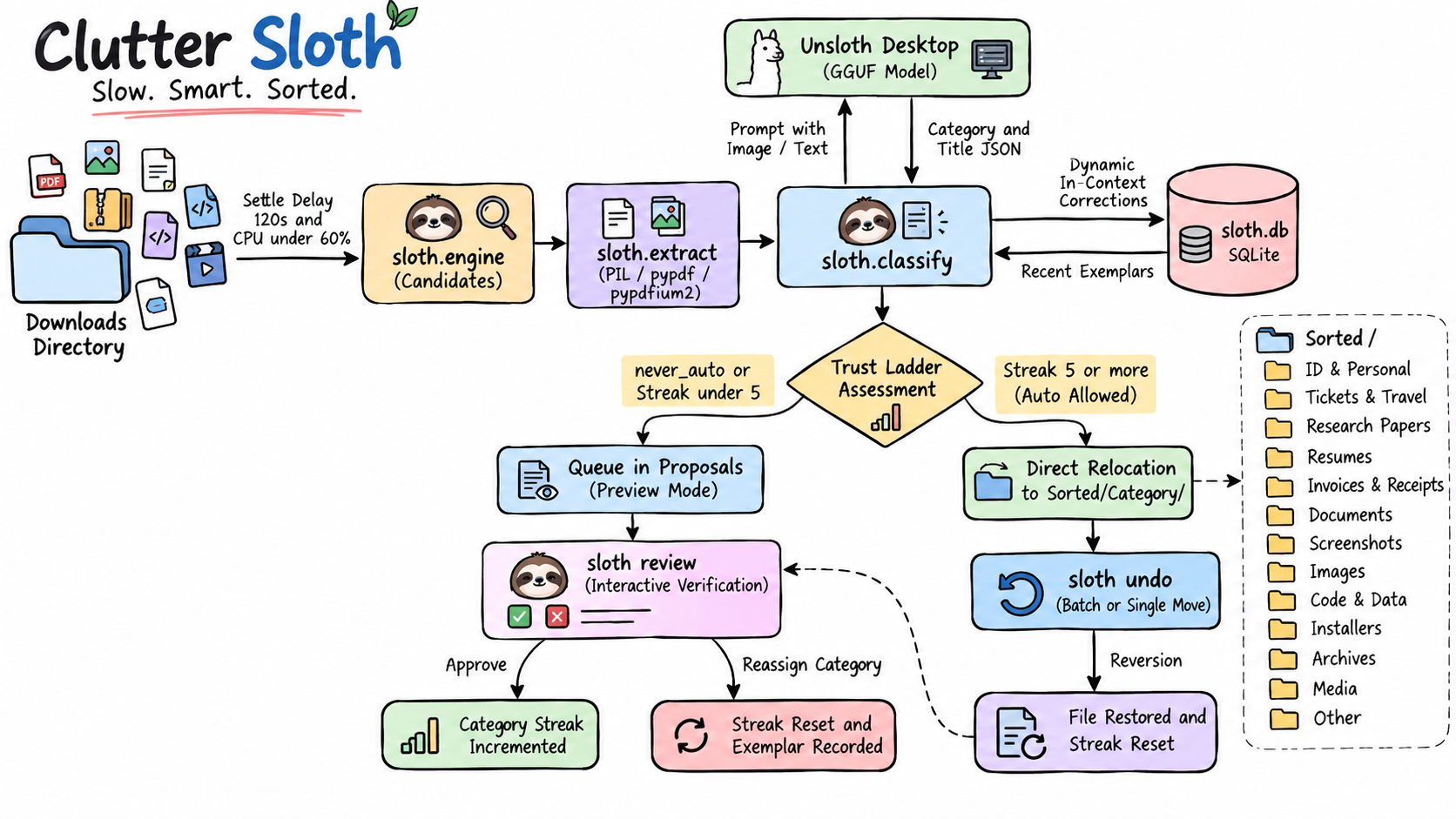
And the trust ladder as a table:
| Event | Effect on category |
|---|---|
| New category | Preview-only |
| Approval | Streak + 1 |
| 5 consecutive approvals | Auto-move enabled |
| Correction | Streak reset, exemplar stored |
| Undo | Streak reset |
Category is ID & Personal | Always preview-only |
Rule of thumb
Give automation permission in proportion to the evidence you have for it, and make the permission revocable in one step. A trust threshold, a per-category scope and an undo command cost very little to build. They turn "I hope it is right" into "I will know when it is wrong."
Closing
The Downloads folder is a strange place to learn about autonomy, but it is where the stakes are personal enough to take seriously. The sloth does not get faster as it learns. It gets quieter.
Code and setup are on GitHub: i-soumya18/clutter-sloth. Local model serving is through Unsloth.
git clone https://github.com/i-soumya18/clutter-sloth.git
cd clutter-sloth
pip install -e .
sloth init      # create configuration
sloth doctor    # verify the connection to local Unsloth Desktop
sloth scan --now
sloth review